When a Simple Black Box Isn't Enough: The Hidden Dangers of Redaction Failures
When a Simple Black Box Isn't Enough: The Hidden Dangers of Redaction Failures
Meta's lawyers thought they had it covered. In their 2025 FTC antitrust trial, they carefully drew black boxes over competitor secrets from Apple, Snap, and Google. Within hours, journalists exposed everything underneath by simply copying the text into a new document. The problem? Those black boxes were just digital makeup—the sensitive data never actually disappeared from the file structure.
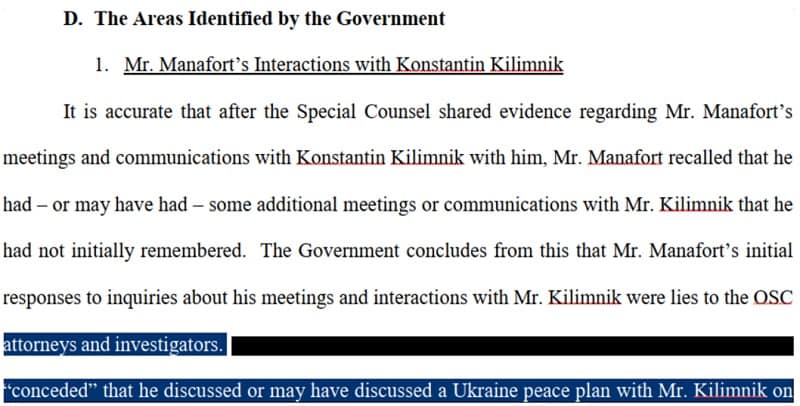
This wasn't an isolated incident. When Paul Manafort's defense team filed court documents in 2019, they made the exact same mistake. Reporters revealed his Russian intelligence connections by copying text from "redacted" sections. The Pentagon, HSBC, even the NSA have suffered similar breaches. The pattern is clear: most organizations confuse visual obscuration with actual data removal, and that confusion costs millions.
Here's what makes redaction failures particularly devastating—you often don't know you've failed until opposing counsel emails you screenshots of your client's privileged communications. By then, the breach notification timelines have started, state bars are asking questions, and clients are questioning whether they can trust you with their most sensitive information. This guide shows you the seven most common redaction mistakes that trigger these nightmares, the technology gaps that make them inevitable, and the battle-tested practices that actually work when compliance isn't optional.
Why Legal Redaction Has Never Been More Critical
Here's something most law firms don't want to admit: 65% have already experienced a cyber incident. And when breaches happen, they're expensive—the global average hit a record $4.88 million in 2024, according to IBM's latest Cost of a Data Breach Report.
For legal professionals, the stakes are even higher. Law firms face an average breach cost of $5.08 million—10% above the global average—because the data they handle is uniquely valuable. Client communications, case files, settlement details, financial records—this is exactly what attackers want. Even worse, 56% of breached firms lost sensitive client information, putting them in direct violation of ABA Rule 1.6.
The regulatory landscape isn't making things easier. GDPR fines continue to escalate globally, while the US has seen an explosion of state-level privacy laws—Delaware, Minnesota, Montana, and New Hampshire all enacted new data privacy acts in 2024-2025. HIPAA regulations tightened further with new compliance requirements taking effect by February 2026, specifically targeting reproductive healthcare data.
This is where proper redaction becomes non-negotiable. Tools like Redact-Pdf use AI to automatically detect and mask PII, PHI, and sensitive data with 99.9% accuracy—essential when manual redaction errors can cost millions. IBM's report found that organizations with extensive AI security tools saved an average of $2.2 million compared to those without.
The bottom line? Redaction isn't just about compliance anymore—it's about survival in an environment where one missed Social Security number can trigger a seven-figure settlement.
The 7 Most Costly Redaction Mistakes (And Their Real-World Consequences)
Drawing Black Boxes Instead of Actual Redaction
When Paul Manafort's defense team filed documents in 2019, they thought blacking out text would hide sensitive information. The Guardian's Jon Swaine discovered he could simply copy-paste the "redacted" sections to reveal everything underneath—including details about Manafort sharing 2016 polling data with a Russian associate.
Meta repeated this exact mistake in their 2025 FTC antitrust trial. According to Safe Redact's analysis, Meta's lawyers used markup tools to draw black boxes over competitor secrets from Apple, Snap, and Google. Within hours, journalists exposed the hidden text by copying it into a new document. The problem? Drawing shapes over text doesn't remove it from the document structure—it just makes it look hidden.
Redact-Pdf solves this fundamental issue with AI-powered permanent deletion that actually removes sensitive data from the document structure rather than simply covering it visually. Unlike basic PDF tools, it achieves 99.9% accuracy in detecting and properly redacting PII, PHI, and other sensitive information with a straightforward upload-redact-download workflow.
Metadata That Tells the Whole Story
Manafort's technology troubles didn't end with failed redactions. When investigators examined a Word document he sent to an associate, the file metadata revealed everything: track changes showed edits made by "paul manafort," and timestamps proved he'd spent over 30 minutes altering the document on a specific date. The metadata became evidence against him.
PDF metadata exposes document creation dates, author names, edit history, software versions, and even geographic locations. Organizations from the Pentagon to Fortune 500 companies have suffered intelligence leaks and security breaches because they forgot to strip this hidden layer. According to the North Carolina Bar's ethics guidance, lawyers who receive documents must avoid mining metadata for confidential information—but they're not required to alert the sender when they find it.
Partial Redaction Patterns
The 2025 Epstein files release showed how partial redaction creates its own problems. DOJ redacted individual victim names but left identifying details like "Jane Doe, age 16, from Palm Beach" intact. Cross-referencing these details made identification trivial.
Format conversion amplifies this risk. Converting Word to PDF without proper redaction tools means the original text remains in the file's XML structure. Testing across platforms—Windows vs. Mac, different PDF readers, mobile devices—reveals inconsistencies where "redacted" information suddenly reappears.
Human redactors make different judgment calls about what constitutes sensitive information, leading to inconsistent patterns across multi-page documents. One reviewer might redact full social security numbers while another leaves the last four digits visible. These inconsistencies create legal exposure and compliance failures.
The Technology Gap: Why Manual Methods and Basic Tools Fall Short
Here's what nobody tells you about redaction software: Adobe Acrobat Pro and Microsoft Word weren't designed to secure classified information—yet legal teams rely on them every day. That gap has cost firms their reputations and clients their privacy.
Paul Manafort's attorneys learned this the hard way. In 2019, they filed a court document using Adobe Acrobat's markup tools—drawing black rectangles over sensitive text. Journalists simply copied and pasted the "redacted" content, exposing Manafort's dealings with Russian intelligence. The tools worked exactly as designed. The lawyers just picked the wrong ones.
The core problem? Most teams confuse visual obscuration with actual data removal. When you use Word's highlight function or Adobe's drawing tools, the original text remains in the file—hidden from view but easily recoverable. The Most Embarrassing Redaction Failures in History documents how HSBC, the NSA, and the Canadian government all suffered breaches from this same fundamental mistake.
Even when teams use proper redaction features, manual review creates systematic risk. Metadata fields hide author information, tracked changes, and document history. A Virginia law firm faced court sanctions after Adobe Acrobat failed to remove all hidden data from their submissions.
Modern AI-powered solutions like Redact-Pdf address these limitations head-on, achieving 99.9% accuracy by permanently removing sensitive data rather than masking it. The system automatically detects PII, PHI, and financial information across PDF, Word, and image files—then provides a Studio editor for manual verification. Unlike Adobe's desktop tools, cloud-based platforms handle volume at scale while maintaining HIPAA and GDPR compliance through built-in security protocols.
Sources:
- The Most Embarrassing Redaction Failures in History - Redactable
- 5 Expensive Redaction Fails - iDox.ai
- What Happened to Paul Manafort's Redactions? - Nextpoint
- Why Traditional Redaction Software Falls Short - Redactor.ai
Common Mistakes to Avoid When Redacting Legal Documents
Here's something most law firms won't admit: 65% have already experienced a cyber incident. The worst part? Many of these breaches happened because someone drew a black box over sensitive text instead of actually removing it. Paul Manafort's defense team learned this in 2019 when journalists simply copied and pasted their "redacted" court filings to expose everything underneath. Meta's lawyers repeated the exact same mistake in 2025, accidentally revealing competitor secrets from Apple, Snap, and Google. The gap between visual obscuration and true data removal is where lawsuits happen—and where careers end. This guide walks through the seven most costly redaction mistakes legal professionals make, the technology failures that enable them, and the battle-tested protocols that actually work when six-figure settlements are on the line.
The Smart Solution: How Redact-Pdf Eliminates Human Error
Traditional redaction methods rely on manual review and basic PDF tools that weren't designed for security-critical workflows. Redact-Pdf addresses this fundamental problem with AI-powered automation that achieves 99.9% accuracy in detecting PII, PHI, and financial data across PDF, Word, Excel, and image files—including mixed-language documents.
The platform's three-step workflow eliminates the manual errors that cost Meta and Manafort's teams their credibility. Upload your document, let the AI automatically detect and mask sensitive information (person names, emails, phone numbers, addresses, credit card numbers, bank accounts), then review everything in the intuitive Studio editor before downloading. Unlike Adobe Acrobat's markup tools that merely cover text, Redact-Pdf permanently removes data from the document structure while automatically scrubbing metadata fields that expose author information and edit histories.
| Feature | Redact-Pdf | Adobe Acrobat | Manual Review | |-------------|----------------|-------------------|-------------------| | Detection Accuracy | 99.9% AI-powered | Manual selection | Human error-prone | | Metadata Removal | Automatic across 30+ types | Requires Document Inspector | Often forgotten | | Full Document Processing | All pages, all file types | Manual page-by-page | Time-intensive | | Compliance | HIPAA, GDPR, SOC 2 Type II | User responsibility | No audit trail | | Review Workflow | Studio editor with verification | Basic comment tools | Spreadsheets and checklists |
Legal professionals handling discovery production, court filings, or client document requests gain hours compared to traditional methods. The platform maintains HIPAA and GDPR compliance through built-in security protocols—your files are processed securely and deleted immediately after download. For high-volume workflows, this systematic approach cuts review time by 75% while providing the audit-ready documentation that proves due diligence when bar complaints arise.
Ready to eliminate redaction failures? Try Redact-Pdf free—no account required for your first document. Select the PII types to redact, upload your file, and see how AI-powered precision protects your clients and your reputation.
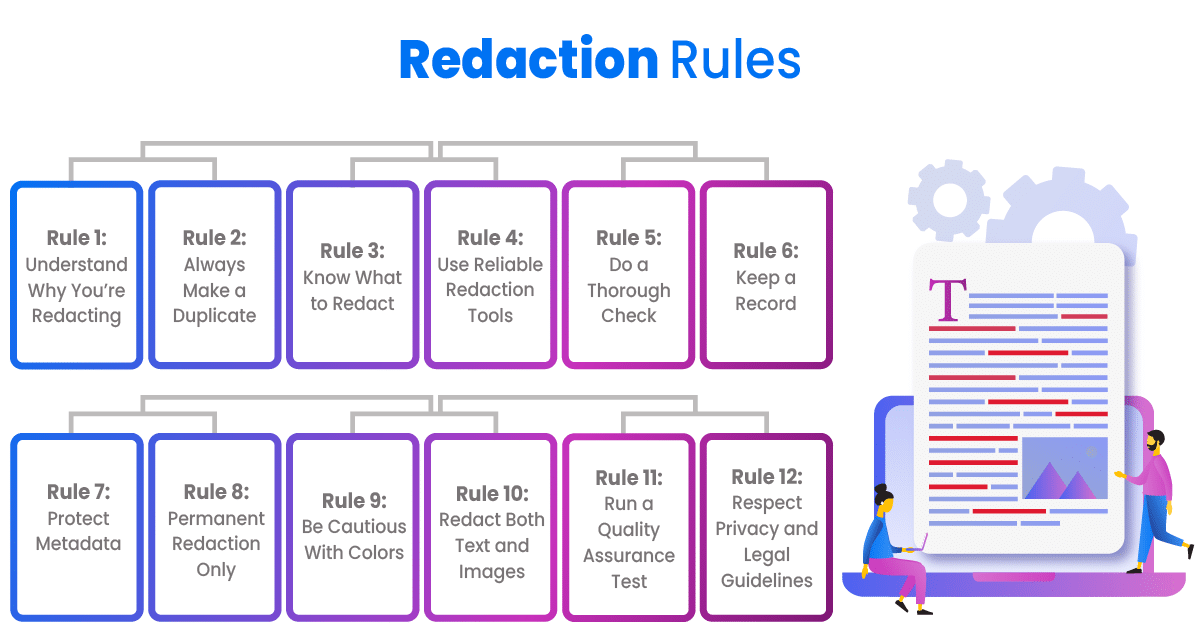
5 Battle-Tested Best Practices for Bulletproof Redaction
Here's what most redaction guides won't tell you: the gap between "doing redaction" and "doing redaction right" is where lawsuits happen. Ask Manafort's lawyers, whose 2019 court filing exposed confidential information because they used highlighting instead of proper redaction—a mistake visible to anyone who copied the text.
Start with comprehensive data identification protocols. Before touching a redaction tool, map every information type requiring protection: privileged attorney-client communications, personally identifiable information (PII), protected health information (PHI), financial account numbers, and work product. Teams at Shopify-level eDiscovery operations follow a simple rule—if you wouldn't post it on your firm's homepage, flag it. Create a checklist tied to GDPR Article 9 categories, HIPAA identifiers, and your jurisdiction's privilege rules. The five minutes spent building this list saves the five hours hunting for missed Social Security numbers later.
Reject manual redaction entirely for high-volume workflows. Word's black highlighter and Adobe's manual markup tools invite human error at scale. Redact-Pdf addresses this with AI-powered detection that achieves 99.9% accuracy across PII, PHI, and financial data—automatically flagging person names, emails, addresses, and credit card numbers in seconds rather than hours. Unlike Adobe Acrobat's manual approach, automated platforms handle mixed-language documents and process full files (not just first pages) with HIPAA and GDPR compliance built in.
But automation isn't set-and-forget. Legal practitioners at mid-size firms typically run a dual-review process: AI identifies patterns, then senior associates verify privileged material using redaction studio interfaces that allow manual refinement. This hybrid approach cuts review time by 75% while maintaining the judgment call that separates "responsive with redactions" from "withheld as privileged."
Scrub metadata like your reputation depends on it—because it does. The document you see isn't the only document you're sharing. According to ZyLAB's research, embedded metadata reveals author names, edit histories, comments, and revision timestamps that completely undermine your redactions. Word's Document Inspector catches surface-level metadata, but comprehensive platforms strip 30+ types across 750+ file formats—including the hidden XML layers in .docx files and EXIF data in scanned images.
Pro tip from discovery coordinators: always export redacted documents to a fresh PDF/A format, then run a second metadata scan. Better yet, make this a workflow requirement—no document leaves your firm until the metadata audit shows clean.
Test your redactions across formats and scenarios. Print the PDF. Copy-paste text from the redacted areas. Open it in three different PDF readers. Extract embedded images. If any of these reveal underlying data, your redaction failed. Planet Compliance studies show that 40% of redaction failures stem from format conversion issues—text remains selectable beneath black boxes or becomes visible when changing contrast settings.
Establish quality control checkpoints with documentation. Every redaction batch needs a sign-off log: who performed the redaction, which tool version was used, what data types were targeted, and who conducted the verification review. When responding to FOIA requests or discovery production, this audit trail proves due diligence if questions arise six months later.
For particularly sensitive matters—regulatory submissions, high-stakes litigation, sealed court filings—implement a three-person review protocol. First pass flags content, second pass applies redactions, third pass verifies nothing leaked through. It sounds excessive until you're explaining to the Bar why opposing counsel can still read your client's trade secrets.
Sources:
- 5 Best Practices in Redacting Legal Documents: A Guide for Law Firms
- Document Redaction for Law Firms: Managing Privilege, Discovery, and Compliance
- Apply Redactions - Avoid Inadvertent Disclosures
- Embarrassing Redaction Failures
What to Do When Redaction Goes Wrong: Damage Control Strategies

The moment you discover a redaction failure, the clock starts ticking. State bars across the country have disbarred attorneys for mishandling confidential information—and your response in the first 72 hours determines whether you face a manageable incident or catastrophic legal exposure.
Immediate containment comes first. Document exactly when you became aware of the breach, what information was exposed, and who accessed it. One law firm facing a 2024 data breach class action learned this the hard way—plaintiffs alleged the firm "intentionally, willfully, recklessly, or negligently" failed to protect client data. Your contemporaneous documentation becomes critical evidence that you acted responsibly.
Here's what happens next: If the breach involves health information, HIPAA's Breach Notification Rule requires notifying affected individuals, HHS, and potentially media within strict timeframes. For GDPR-covered data, you must notify supervisory authorities within 72 hours of discovery. California now mandates notification within 30 calendar days for breaches affecting state residents—no more "unreasonable delay" wiggle room.
While you're managing the crisis, prevent future failures with Redact-Pdf, which achieves 99.9% accuracy in automatically detecting PII, PHI, and privileged information across multiple document types. The platform's Studio editor lets you verify every redaction before distribution—exactly the kind of systematic review that could have prevented Carlton Fields' February 2025 breach.
Real consequences: The Louisiana Supreme Court disbarred attorneys in 2024 for violating honesty, competence, and diligence rules—the same standards that apply when you mishandle redacted documents. Your firm needs a documented breach response plan that assigns specific roles, establishes notification workflows, and maintains audit-ready evidence logs. Don't wait for a bar complaint to build these systems.
Common Mistakes to Avoid When Redacting Legal Documents
Here's something that keeps general counsels awake at night: 65% of law firms have already experienced a cyber incident, and the average breach costs them $5.08 million—10% more than other industries. Why? Because the data lawyers handle is uniquely valuable to attackers, and one missed Social Security number can trigger a seven-figure settlement.
The problem isn't just external threats. Most redaction failures happen from within—attorneys using Word's highlighter thinking it hides text, firms converting documents without stripping metadata, teams drawing black boxes that reveal everything underneath when you copy-paste. Meta's lawyers just learned this lesson the hard way in their 2025 FTC trial, exposing competitor secrets from Apple and Google because they used markup tools instead of actual redaction.
You'll discover the seven most catastrophic redaction mistakes (backed by real cases like Manafort's 2019 disaster), why traditional tools like Adobe Acrobat weren't designed for legal-grade security, and the five battle-tested protocols that prevent inadvertent disclosure. More importantly, you'll learn what to do when redaction goes wrong—because in today's regulatory environment with GDPR, HIPAA, and state privacy laws tightening annually, "I didn't know" isn't a defense your malpractice carrier wants to hear.
Protecting Your Practice: The Path Forward
The pattern across every redaction failure is identical: teams trusted visual obscuration when they needed permanent deletion. From Manafort's lawyers to Meta's legal team, the mistake wasn't incompetence—it was using tools designed for different purposes and hoping for the best.
The shift from manual to automated solutions isn't optional anymore. When IBM's 2024 report shows organizations with extensive AI security tools save $2.2 million on breach costs compared to those without, the ROI calculation becomes straightforward. Redact-Pdf addresses the core vulnerability by achieving 99.9% accuracy in automatically detecting and permanently removing PII, PHI, and financial data across PDF, Word, and image files. Unlike Adobe's manual approach, it strips metadata from 750+ file formats, handles mixed-language documents, and maintains HIPAA/GDPR compliance through built-in security protocols—all with a simple upload-redact-download workflow.
Start with concrete next steps: audit your current redaction process against the five best practices detailed above. Document who performs redactions, which tools they use, and whether you're testing across formats and platforms. Establish a dual-review protocol where AI flags sensitive patterns and experienced attorneys verify privileged material. For firms handling high volumes, implement three-person verification for regulatory submissions and sealed court filings.
Test your current process right now: Take a redacted document you filed last month. Can you copy-paste text from the blacked-out areas? Does the metadata still show your name and edit history? If either answer is yes, you're one opposing counsel away from a bar complaint.
Try Redact-Pdf's no-account-required demo with your most recent filing—select PII types, upload, and see what your current process missed. The cost of inaction is $5.08 million. The cost of proactive protection is fifteen minutes and a systematic workflow change.